See Productivity in Real Time.
Monitor employee activity, track work hours, and improve team efficiency with powerful insights.
The best free timesheet software for small businesses is WorkDesQ, Jibble, TimeCamp, Toggl Track, Clockify and Connecteam. All software provides free trial versions but their features and limits are different from each other.
For running a small business every hour is important and tracking employee time in spreadsheets has become so difficult and comes with mistakes and time-consuming. These timesheet software helps you record employee hours, managing attendance, monitoring overtime and maintaining records for payroll processing without any manual work
In this guide we let you know the plan limits of free time sheet software for small businesses, time tracking features, ease of use and how to choose the best timesheet software which suits your company.
What Is Free Timesheet Software for Small Business?
Small business timesheet software is a tool that records employee working hours without charging a monthly fee. Instead of using paper sheets or updating Excel files, employee can submit their start time and end time without putting in any effort.
Daily time tracking makes it easy for small business like a manager can view employee working hours, identifying missing entries and check overtime within a single dashboard.
A good timesheet app for small business typically supports
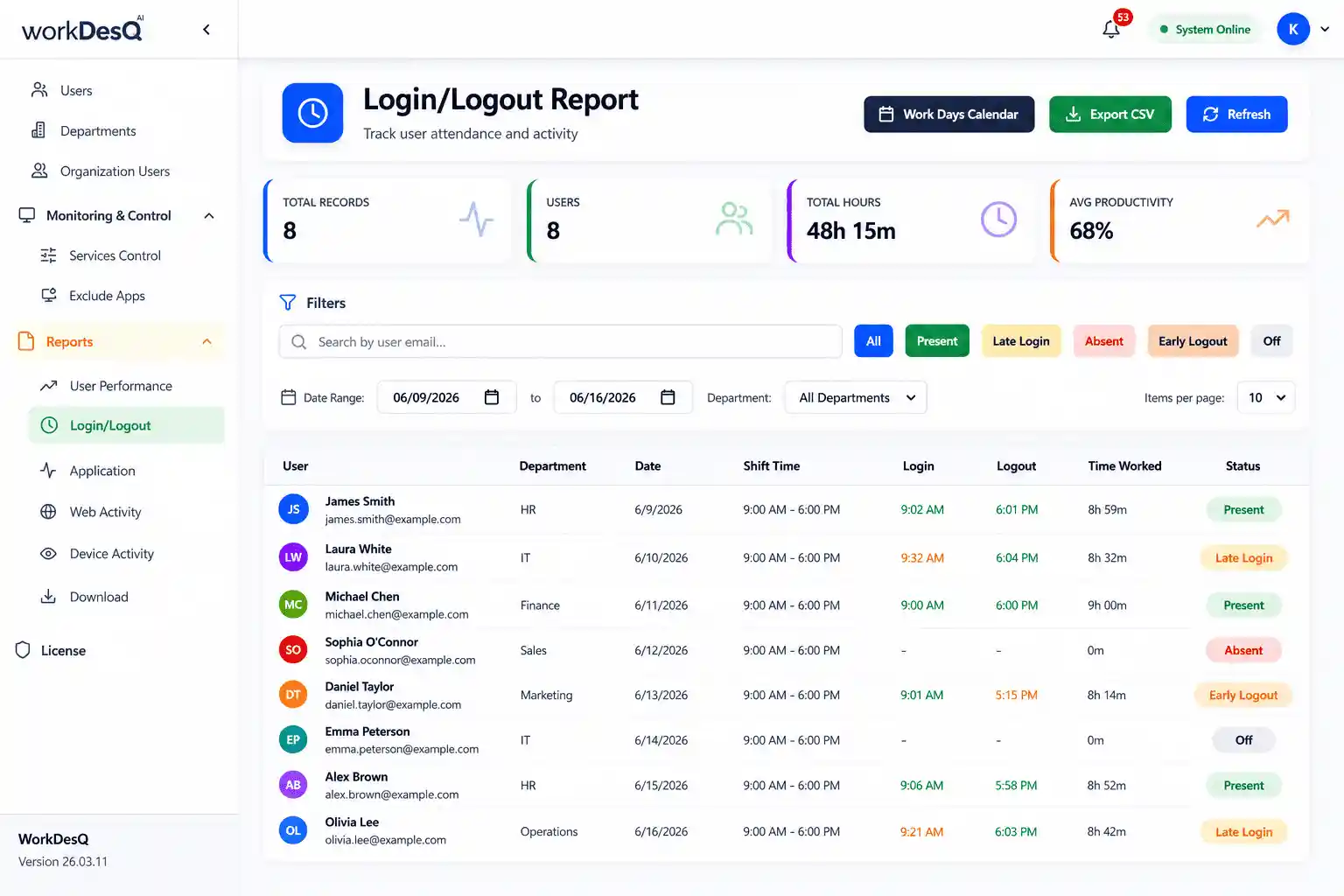
- Employee time tracking
- Login and logout tracking
- Monitoring break hours
- Generate overtime data
- Basic reports of employee attendance
Software reduces your time wasting and employees get paid correctly according to working hours.
What to Look for in Free Timesheet Software
If you are choosing free timesheet software for a growing business then it may not be useful because some features come with limitation in free plan. Before selecting any tool you should check these important areas.
- Number of users
First check if the software supports your current team size or not because many software allow you to add from 1 to 5 employees in free plan.
- Easy time entry
Employees submit their login and logout easily without learning lengthy process.
- Mobile access
If an employee is working outside of office or working in multiple locations. Make sure software supports mobile access.
- Timesheet reports
Check weekly and monthly reports which are easy to understand and export.
- Overtime and breaks
Accurate records help to reduce payroll errors so employees get accurate salaries.
- Project tracking
If you are charging payments on an hourly basis then feature is important for you.
7 Best Free Timesheet Software for Small Business
| Software | Best For | Free Plan | Key Features |
|---|---|---|---|
| WorkDesQ | Time tracking & employee work monitoring | Up to 5 users | Time tracking, employee work monitoring, work activity visibility, attendance tracking and productivity tracking |
| Jibble | Time & attendance | Contact Team | Time tracking, timesheet and attendance |
| TimeCamp | Growing teams | Unlimited | Time tracking, timesheet and project tracking |
| My Hours | Project time tracking | Up to 5 active users | Manual timesheet, unlimited projects and clients, web and mobile access |
| Toggl Track | Simple time tracking | Up to 5 users | Timer, manual time entries, simple time tracking |
| Clockify | Time & project tracking | Free plan available | Timer, manual entries and reports |
| Connecteam | Shift & field teams | Free plan available | Time tracking, clock-in/out |
Free Timesheets for Up to 5 Users. Simple Time Tracking. Better Business.
Difference Between Free and Paid Timesheet Software
The big difference is not in recording timings; the difference comes when your team is growing and you face problems during business growth.
| Feature | Free Timesheet Software | Paid Timesheet Software |
|---|---|---|
| Reports | Basic weekly and monthly reports | Detailed reports with filters and export options |
| Employee Limits | Maximum up to 5 users | Usually supports larger teams |
| Timesheet Approvals | May not include approval and rejection options | Managers can review and approve submitted timesheets |
| Project Tracking | Basic project and task tracking | Track hours by project, task and client billable hours |
| Scheduling | No scheduling feature | Supports employee schedules and shift working hours |
| Customization | Fewer editing options | Options to set rules, workflows, and user permissions |
Free timesheet software is enough for tracking small teams but paid software becomes useful when you need more user limits, reporting requirements, approvals, payroll workflows and detailed reports.
Conclusion
The best free timesheet software for small businesses depends on actual work style. WorkDesQ, Jibble, TimeCamp, Toggl Track, Clockify and Connecteam are strong options that have free plans to use. WorkDesQ is far better because it combines timesheets with employee monitoring.
Do not choose software because it just says “free” first you have to check user limit, features ,reporting depth ,mobile access and upgrade rules. The purpose of the right software is easy for time tracking not to create additional work.