Trusted by 15,000+ Organizations Worldwide

Screen Monitoring Software
For Clarity & Control

It is not easy to manage a modern team, employees are working from different locations, devices and on flexible schedules. Screen monitoring software helps business owners and managers to see what employees do on their screens during working hours. With this tool managers can view employee screens and understand their work and keep everything clear without any confusion.

Free Trial
Free Trial Available
Instant Results
Instant Results
Enterprise Grade
Enterprise Grade
Why Screen Monitor Understanding Screen Monitoring Software
What is Screen Monitor Software?

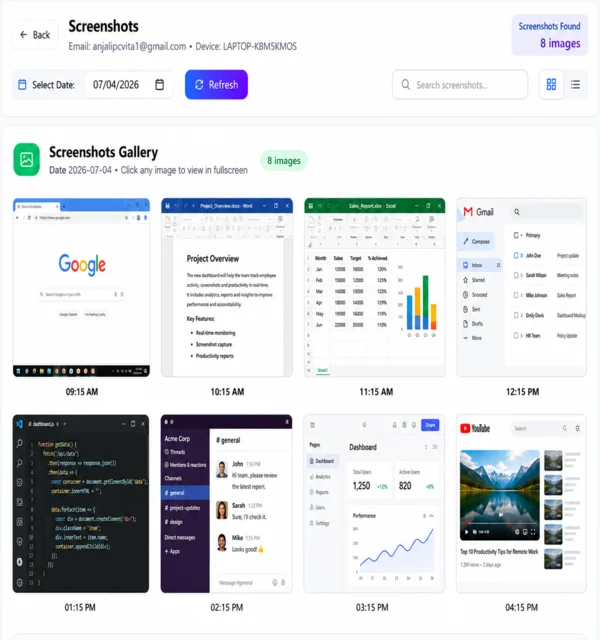
Screen monitoring is a tool which tracks and records employee activity on computer or laptop screens during shift hours. With our tool companies can track activity, capture screenshots and understand how tasks are handled by employees. Employee screen monitoring helps to maintain trust and transparency between employees and companies.

 logo
⭐ ⭐ ⭐ ⭐ ⭐

5/5

 logo
⭐ ⭐ ⭐ ⭐ ⭐

5/5

 logo
⭐ ⭐ ⭐ ⭐ ⭐

5/5

Logo
⭐ ⭐ ⭐ ⭐ ⭐

5/5

Why Teams Use Why Use

Why Companies Use Screen Monitoring?

Companies use screen monitoring software because it ensures work clarity without interrupting employees.

Reducing Confusion
Reducing Confusion

Current tasks become clearly visible with the help of our screen monitoring software

Avoiding Miscommunication

Screen visibility removes guesswork and keeps everyone on the same page.

Improving Time Accuracy
Improve work clarity

Work can be reviewed directly without asking employees again and again.

Eliminate Timesheet Fraud
Handle remote teams easily

Screen monitoring software can easily handle remote teams because it captures the employee’s screen, does not matter where they are working from.

Reduce Delays Faster

When teams stay focused and aligned productivity rises naturally and managers can spot inefficiencies at early stages.

Enhance Accountability

Team members responsible for their every task because work activity recorded fairly and transparently.

How Features

Feature of Screen Tracking Software

Simple Interface

Very Simple
Interface

Remote Screen Access

Remote Screen
Access

Highly Configurable

Highly
Configurable

Screen capturing

Screen
Visibility

Automatic Screenshots

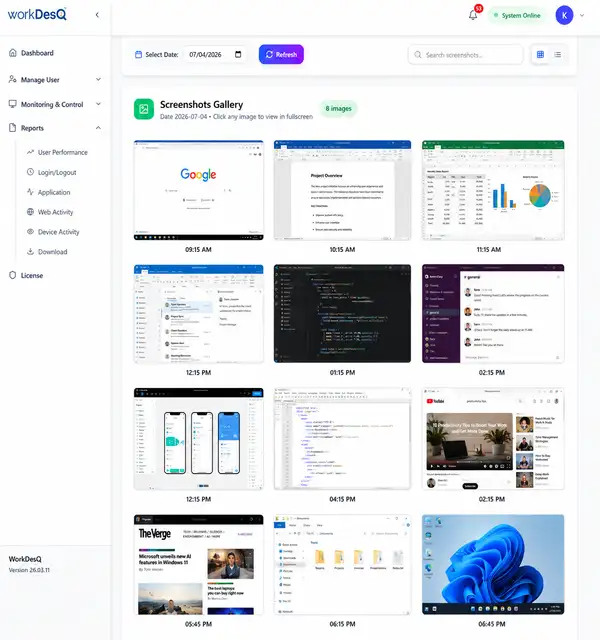
Screenshot monitoring software captures screens at regular intervals.

Website,app usage recording
Live screen view

Live screen view allows real-time visibility of employee activity

Time Tracking Sheet
Secure screen capture

Our screen capturing monitoring software keeps all data safe and secure

Screen Monitor Screen Monitor

Who Needs Screen Monitoring?

Every business model that depends on computers and laptops can use our software screen monitoring. Here are some top groups can use –

Clear Time & Work Tracking

Our screen monitoring software solves this by providing real time remote team screen recording activity and giving managers without interrupting employees.

  • Better accountability by linking time spent to actual task.
  • Accurate performance based on real work data, not assumptions.
  • Improved time management .
Activity Tracking

Activity Tracking

Active Time

Active Time

Website Usage

Website Usage

Benefits Benefits Screen Monitor

Benefits of Using Screen Monitoring Software

  • Better visibility of employee work
  • Helps to make a clear and transparent work environment
  • Easy screen monitoring without disturbance
  • Proof of work through screen capture
  • Helps control remote team activity
  • Get Live Work Updates
Connect With Experts
Why WorkDesQ Types

Work Screen Tracking Tool

We know that every company works differently and so do teams. That is why all screen monitoring tools serve the same purpose. Here are the examples of types monitoring tools – 

Screenshot Monitoring
Screenshot Monitoring tools

It takes automatic screenshots during work so managers can easily understand what was done from different time zones

Activity monitoring
Activity screen monitoring tool

This helps managers check how employees spend their time on screens during shift hours.

Real time monitoring
Live screen monitoring software

It allows real time screen viewing so managers can see what employees are doing currently

Screen Monitoring Safety Screen Monitoring Safety

Is Screen Monitoring Safe?

Yes, it's 100% safe when used responsibly and honestly. Our best screen monitoring software ensures end to end privacy data, no personal tracking outside working hours, no keystroke logging, no camera accessing and no personal file scanning.

cloud-solutions of screen monitoring
Screen Monitoring Safety Solutions
End to End Data Encryption

Our screen Monitoring software ensure end to end security all screen recording, screen shots and activity logs protected with AES 256 and prevent from unauthorized access data or data leaks.

real-time screen monitoring
Screen Monitoring Safety Solutions
Role Based Access Control

Only authorized managers and admins can view screen monitoring data. Access level ensure that sensitive employee information is visible only approved roles.

Challenges Challenges

Screen Monitoring Tool Challenges

Yes, it is true screen monitoring software improve efficiency but come with challenges like misuse and handling data effectively.

Employees feeling watched
Points
Employees feeling watched

Purpose

When you start to track their screens, explain their purpose clearly.Whats track and whats not track.It built transparency.

Privacy Concerns
Privacy
Privacy Concerns

Privacy

Track only during working hours and avoid tracking after shift hours.You have no right to track employees screen after shift hours

Screen Monitoring
Over Tracking
Over Screen Monitoring

Not for Personal

Use activity on productivity insight not for whole day and it leads to too many screenshots.

Data Security
Data Security
Data security

Security

Software collects all data during shift hours including your screenshots and activity logs.Misuse of data become compliance liability.

Misinterpretation of Productivity
Productivity
Misinterpretation of Productivity

Monitoring activity

Screen monitoring activity does not equal to productivity. Sometimes employees may think, planning and attending calls without screen movement.

Compliance Risk
Legal
Legal & Compliance Risk

Compliance

Different countries have strict data protection law. Improper use of screen monitoring tool can lead legal penalties.

Demo Video

Screen Monitoring Software -Video Guide

In this video, you will learn how screen monitoring software works and how you can take screenshots of employees’ screens easily. With WorkDesQ, you can monitor screen activity in real time and stay updated with your team’s work. This video guide will also show you how to set screenshot frequency based on your needs and will help you understand how to track employee screen activity efficiently and manage your team better.

Video
Common Questions
Frequently Asked Questions

Find quick answers about our security platform, deployment options, compliance standards, and key features.

Still Have Questions? Our Team is Here to Help!

Contact Our Experts
What Our Clients Say
Client Success Stories

Our software monitoring software converts their success stories into proofs and helping users see not just what does software does but how delivers real value

"Thanks, WorkDesQ your software has transformed how we manage our remote teams. I can easily track project and progress and review activity logs"

SM

Sarah M

Project Manager

"With your screen monitoring tool now, we have clear insights into agent performance, like call handling and break times. Thanks, WorkDesQ teams."

RK

Rajesh Kumar

Operations Head

"I love this tool because it records my work activity and billable hours. It provides proof of work to my clients."

PS

Priya S

Freelance Graphic Designer

Ready to Get Started?

Join thousands of security teams protecting their organizations. Start with our free plan today—no credit card required.