If you notice your screen flickering repeatedly and your battery draining faster than usual, it is possible that employee work monitoring software is running in the background on your laptop. This is common in remote and hybrid work environments, so there’s no need to worry.
In this blog, we will explain what monitoring is, why it is done and where you might find work monitoring software installed. Please note that if your manager or HR department installed this software you should not uninstall because it leads to termination. This blog is for informational purposes only to help you identify employee work monitoring software.
What Employee Monitoring Really Means
When a company wants to monitor its employees during office hours and check work location and activity, this is done through software installed on your laptop. For more information about what employee work monitoring software is, you can visit our homepage. Many companies use monitoring software for the following purposes:
- Work hours and attendance
- Active time and idle time
- Which applications are being used
- Productivity trends
The truth is, monitoring itself is never wrong. It is a company’s right. However, it is wrong if employees are unaware of the monitoring.
When Your Laptop Suddenly Slows Down
When software from a reputable company is installed, it works silently in the background of your laptop, but “silently” doesn’t mean it’s invisible. You might suddenly notice these things:
- Your laptop battery is draining even when you are not actively using it because the software starts working as soon as the laptop is turned on and even if you are just sitting there with it on because its operating frequency is already set.
- The fan is running unnecessarily because the fan’s job is to remove heat and keep the laptop cool, but you will notice that your laptop is on for a long time without using it, yet the fan is still running.
This happens when any software is running in the background; it doesn’t necessarily have to be monitoring software; it could be any other software. One important thing to understand is that even good software will run slowly on an old laptop. When this starts happening to you unexpectedly, this is a signal that you can use to detect monitoring software on your laptop.
Sudden Battery Performance Drop
As we mentioned earlier, the software starts running as soon as your laptop turns on, even if you’re not actively using it. If you’ve noticed this for a while,
- Your battery used to last 7 hours but now only lasts 3 or 4 hours. This is also an signal that software is running in the background on your laptop.
- Your usage patterns have not changed, but the battery is draining faster.
We recommend checking your battery health before making any decisions. This is also a way to detect background software activity.
Checking Installed Software
You can easily check whether monitoring software is installed on your laptop, regardless of whether you have a Windows or Mac laptop.
On Windows: Go to Settings → Apps → Installed Apps
On Mac: Open the Applications folder.
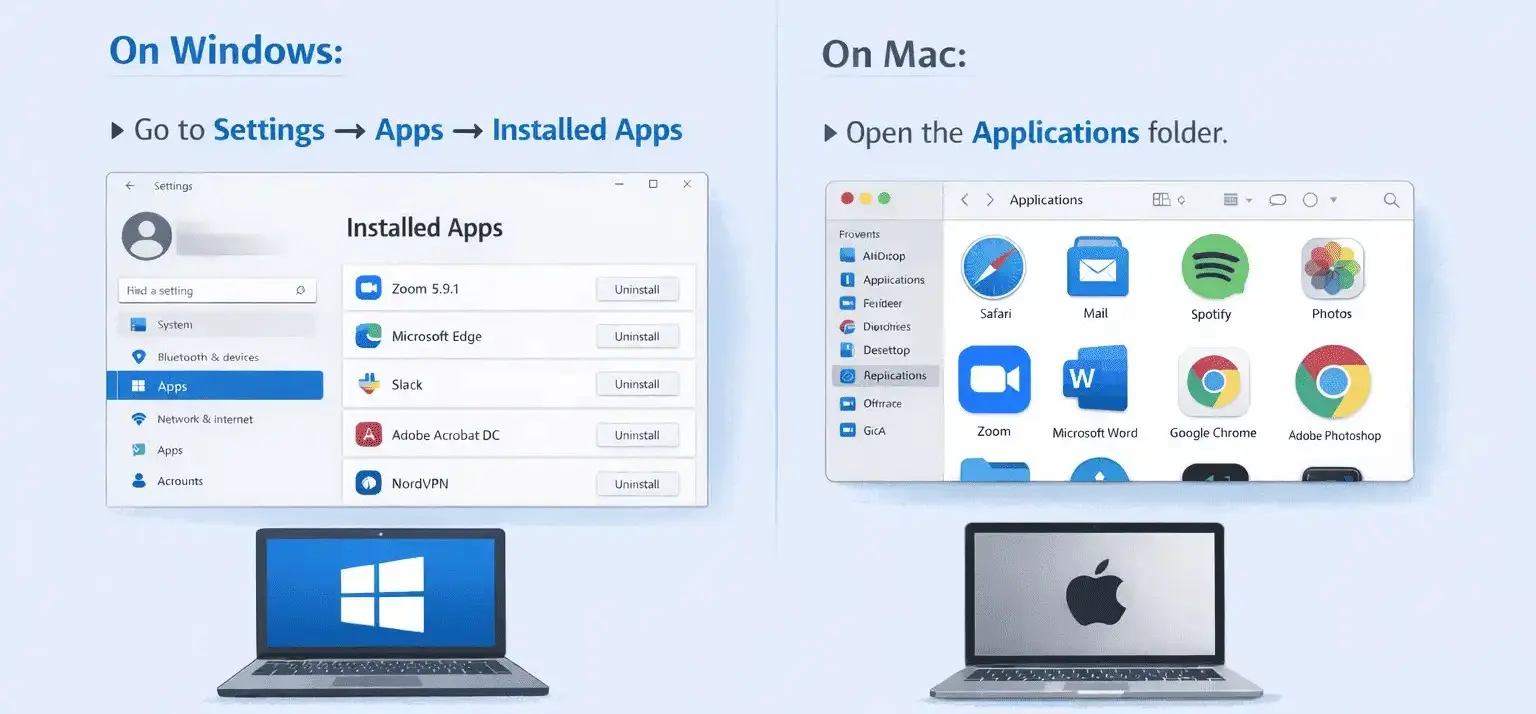
Then, you need to look for any apps that you haven’t downloaded or installed yourself.
All software has different names, but I will explain how the names of such software usually start, such as System Agent, Management Tool, or Productivity Tool. Many companies also name the software after their brand. If you see any such tool on your office laptop, don’t panic. Ask your HR or manager about the tool.
Using these methods, you can detect work monitoring software on your laptop.
Background Processes Reveal the Truth
It does not matter whether you have a Mac or a Windows laptop, you can use Task Manager or Activity Monitor to detect tracking software. You can see which processes are constantly running on your laptop and whether the CPU is being used even during idle time.
The main function of monitoring software is that it never stops running and it only shuts down when your laptop is turned off. Once you identify this software do not uninstall it immediately as it may have been installed by your HR department or manager to track your work. Uninstalling it could be against company policy.
Unusual Network Activity
Monitoring tools are constantly sending screenshots of your laptop to some location. You can detect monitoring software by observing your internet usage:
- If you’re not using the internet, but your internet usage is increasing,
- There’s upload activity running in the background on your laptop,
- Unknown connections are working automatically.
Some employees only realise this when their internet usage increases unexpectedly without them doing anything; this happens when screenshots are being uploaded.
Screen Signs You Might Notice
When you notice unusual screen behaviour like your screen flickering repeatedly, experiencing micro-log when switching tabs or suddenly feeling like a screenshot has been taken, software does similar behaviour. A single occurrence is not necessarily a cause for concern, but if these things happen repeatedly, it needs to be known. You can also detect this behaviour using screen monitoring software.
Check Your Company Policies
If a company is monitoring its employees, it never hides this fact from them. If you feel your work is being tracked, check your documents from when you joined and when you were assigned this laptop.
- Check your offer letter; it will definitely be mentioned somewhere.
- It will be in the IT & device usage policy.
- If you are working remotely, it will certainly be mentioned in the remote work guidelines.
We will tell you the easiest way to check the company policy. Some keywords are usually mentioned, such as “company device may be monitored,” “work tracking activity,” or “security and productivity tools.”
We have noticed that many employees ignore these policies and companies always include a line about monitoring in their policies. You can also detect monitoring software by reading the company policy.
Signals in Manager Behaviour
It is not just the software that gives signals but your manager also gives hints. If you pay close attention to what your manager says, you will find your answer. Now let us tell you what things you should notice:
- Your manager might mention activities you haven’t shared with anyone like using social media during working hours and then tell you not to use social media.
- You might be taking longer breaks than usual but haven’t told anyone, yet your manager somehow finds out and talks to you about your breaks.
- They might show you screenshots of your activity and ask why you opened certain applications at specific times.
If your manager does all these things, you can understand that your work is being tracked through some software, and you can detect this tracking software on your laptop based on these signals from your manager.
Start the Conversation the Right Way
When you’re using an office laptop, the company has the right to track your work activity because it’s important for them to know how their employees are performing. Employees also have the right to ask manager or HR what data the software is collecting rather than directly asking if they are spying on you. A smart employee will always ask the question in the right way such as “How is this software used?” This approach seems professional and demonstrates a desire for transparency.
With this correct approach you can easily detect monitoring software and the company will explain what the software does, how it works and why it is being used.
When Monitoring Is Fair and Clear
When your work is being monitored correctly, you have absolutely nothing to worry about, and we’ll explain what proper monitoring entails.
- Everything is clearly explained to you.
- Only work hours are tracked, nothing beyond that.
- Always respect your privacy.
Every employee has the right to know about the monitoring process. This leads to improved employee productivity, and you can learn how to track productivity through software by visiting our features page.
Final Takeaways on Monitoring Awareness
Monitoring employees’ work is not about being a spy and it is about identifying patterns and avoiding assumptions. Be clear about the facts.
If you are using a company laptop the company will have right to monitoring but you also have the right to know what is being monitored and why. Once you understand these things your concerns will be removed and you can focus on your work. If you discover work tracking software, do not attempt to uninstall it, as this could lead to termination.