See Productivity in Real Time.
Monitor employee activity, track work hours, and improve team efficiency with powerful insights.
A company laptop policy agreement template is a formal ready to use document that explains rules and guidelines for company owned laptops and desktops. This template is mostly used by the HR and IT departments and this format helps HR create a new company laptop policy quickly.
In simple language companies use this laptop policy template when they give laptops to new employees or remote employees and this document helps explain how to use a company laptop during working hours and the best company laptop policy agreement template includes sign off sections which protect company laptops and employee gets guidelines to maintain laptop properly and use responsibly.
Free Company Laptop Policy Agreement Template
1. Purpose & Scope
This company laptop policy explains the rules for using company laptops properly. It applies to everyone who works for the company and gets a company laptop, including employees, contractors and temporary staff.
2. Device Ownership
- The laptop, charger and all accessories remain company property.
- Employees should return the company laptop and all accessories before their last working day.
3. Employee Computer Use Agreement Rules
- The laptop is mainly used for company work. During breaks, employees can use it for limited personal work.
- Employees are not allowed to use the company laptop for illegal activities, offensive content or downloading movies.
4. Data Security & Privacy
- Every employee must use a strong password and must not share it with friends or family.
- If you are using public Wi-Fi, you should use only a company approved VPN.
5. Care, Theft and Damage
- Use the laptop in a safe place and do not leave the company device inside a vehicle or in a hot place.
- If your laptop is stolen, you must inform the IT department within 2 hours.
Employee Acknowledgment & Sign-Off
I confirm that I have read the company laptop policy carefully and I will follow all terms and conditions mentioned in the policy.
Employee Name: ____________________________
Device Model & Serial Number: ____________________________
Date Issued: ____________________________
Employee Signature: ____________________________
Why Do Companies Use Laptop Policy Agreement?
Companies use a laptop policy agreement because it maintains transparency and accountability between company and employees and here are some important reasons
- The agreement explains how employees use a company laptop during office hours or after office hours
- It protects company data and important business information
- Policy does not allow misuse of laptop
- Employees get full information about laptop damage or theft
- It explains what employees should do if a laptop is stolen
- It reduces confusion by explaining clear rules and conditions
- Support safe and professional work environment
- It helps the company follow security and legal requirements
- It explains the laptop return process when an employee leave
How to Customize This Company Laptop Policy Template
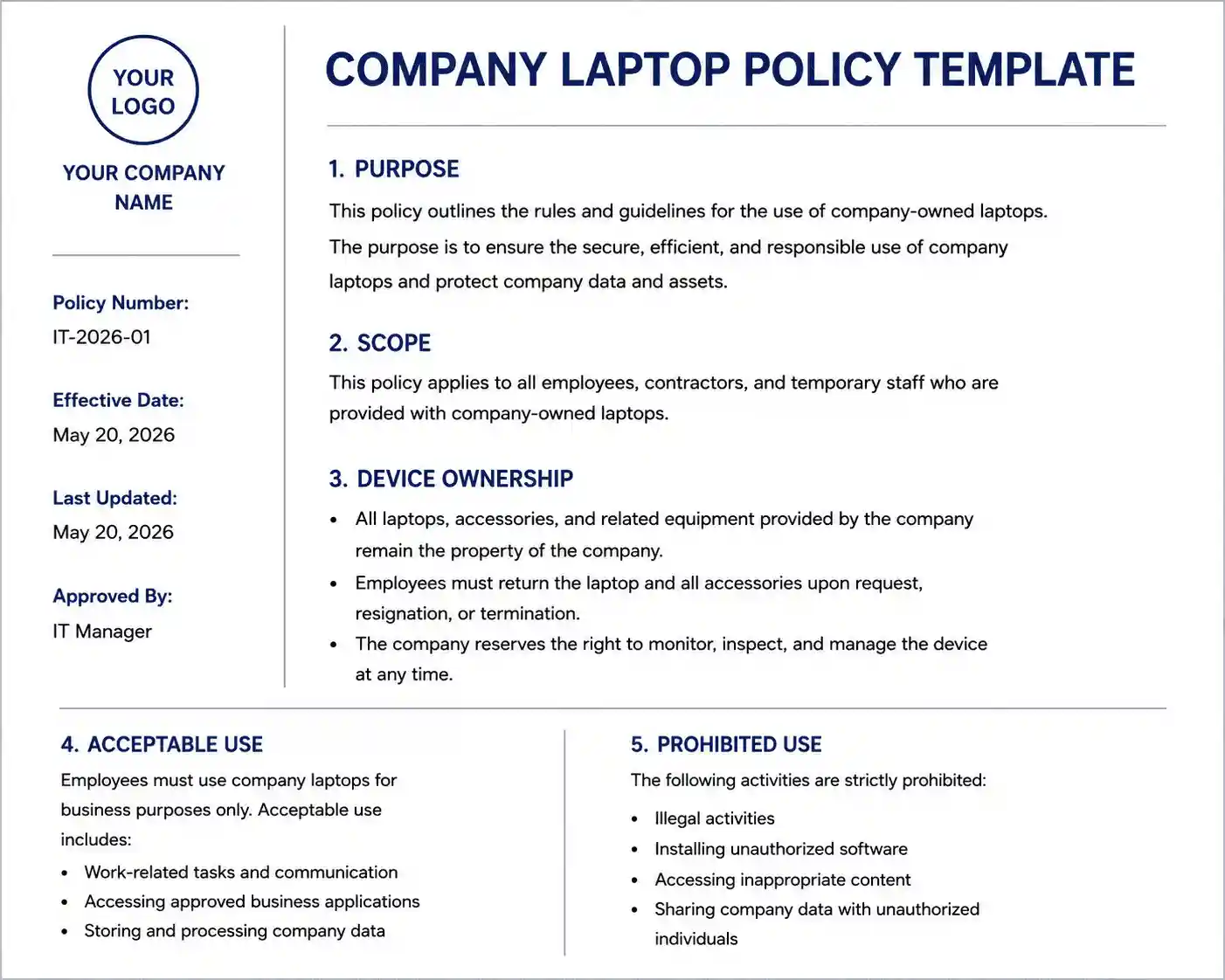
- Add the company name at the top of the template
- Add the logo of your company if needed
- Mention policy date
- Mention department and employee name
- Explain information about your laptop brand name and model name
- Add company rules if your company wants to apply them
- Write about security rules and legal risk
- Add some lines about the technical problem process
- Review the template content and ensure it matches your requirements
- Ask every employee to read and sign the policy before receiving company laptop
When Should Companies Use This Laptop Policy Template?
- Companies give laptops to new employees
- Employees who work from home or in a hybrid role
- Companies want clear rules about company owned laptops
- Businesses want to reduce laptop loss damage and misuse
- Businesses need written policy for HR, IT and for maintaining legal records
- The company wants employees to sign the laptop agreement on laptop agreement before taking laptop
Best Practices Before Implementing a Company Laptop Policy
Review by HR and IT
HR and IT must review the policy before implementing company laptop policy and ensure rules are clear and practical
Explain policy during employee onboarding
Before giving laptop to new employee, you must explain company laptop policy and other important rules
Update policy annually
The policy should be updated every year and kept up to date with technology
Train employees
Provide training session to employees so that they know how to use laptop safely and follow company laptop usage policy
Use simple language
The policy must be written in simple and easy language so that everyone understands easily
Define employee responsibilities
The policy must clearly explain employee responsibilities about employee responsibilities
List of prohibited activities
The policy should explain that employees are not allowed to download unauthorized software
Apply policy equally
The company laptop policy should be used equally for all employees for all employees and rules also apply equally
Top Mistakes While Choosing Company Laptop Policy Template
- Choosing a basic template that does not cover company laptop usage rules
- Missing security rules because the template does not explain password use and software installation
- Choosing a template that does not explain remote work laptop usage
- The template does not have a loss and damage clause
- Using a template with difficult language
How WorkDesQ Helps You Track Company Laptops
WorkDesQ helps businesses keep track of company laptops from one place. With WorkDesQ software you can
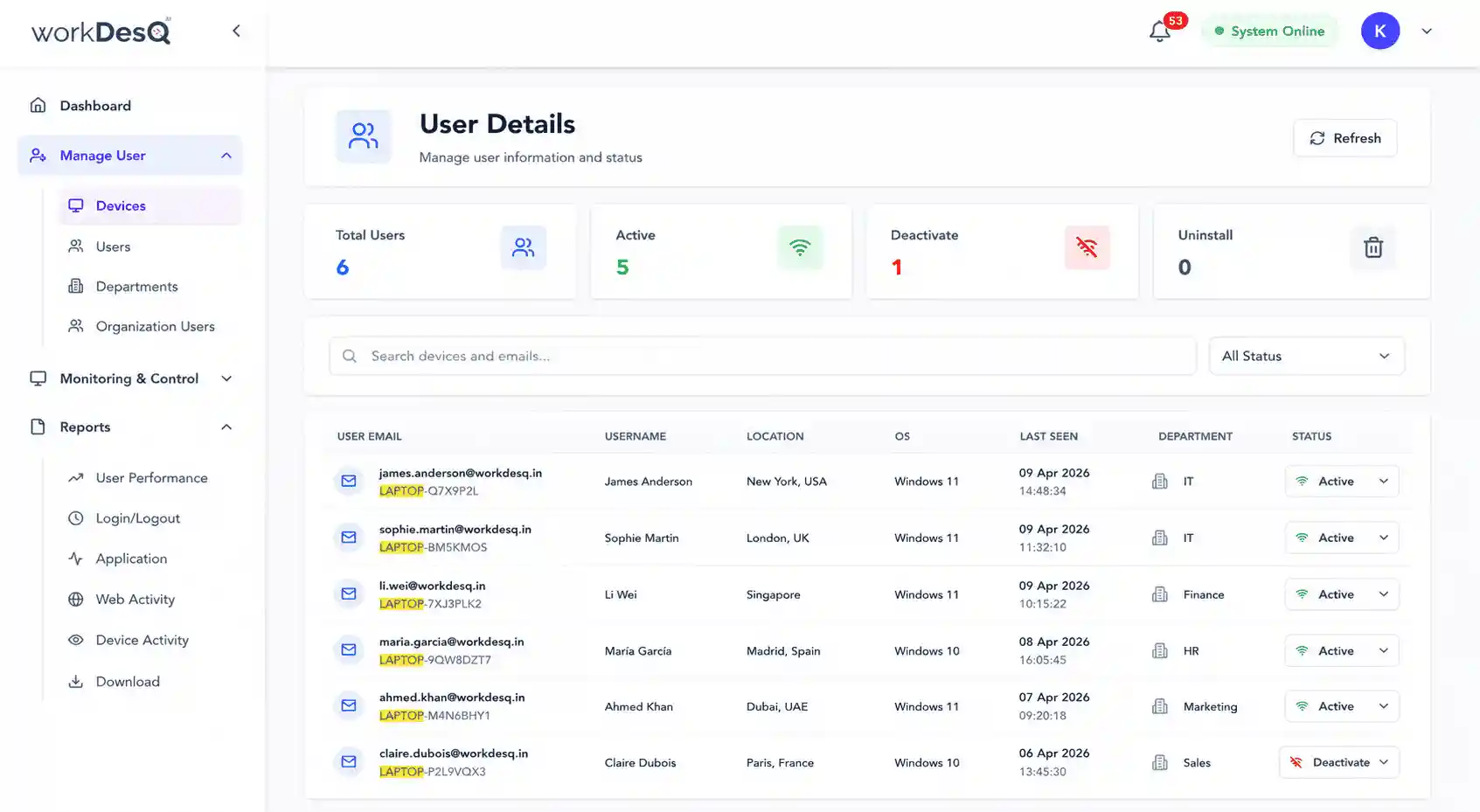
- See which employee is assigned the company laptop
- Keep a record of laptop details
- You can easily track company laptop usage during working hours
- It helps you monitor installed applications and software usage
- Reduce risk of lost company laptops
- You can track whether an employee is working on the laptop