See Productivity in Real Time.
Monitor employee activity, track work hours, and improve team efficiency with powerful insights.
Measuring employee performance is not easy especially in large teams because as a manager you have to check each and every task of an employee. An effective performance measurement process helps managers to understand productivity, work quality, goal achievement, efficiency, attendance and overtime.
Data analytics improves employee performance measurement by turning workplace data into clear insights and managers not depending upon personal opinion, managers use data while reviewing performance.
For example, if an employee misses deadlines repeatedly, then data helps managers identify whether the problem is with the employee, workload, unclear goals or unnecessary meetings. With this discussion, become more practical and improvement focused.
Why Is Measuring Employee Performance Difficult?
Measuring employee performance can be difficult because every job role output is different like for a salesperson, measuring customer satisfaction and for the design role measuring on the basis of website quality, deadlines and feedback.
Old performance review methods sometimes confuse managers because they totally depend upon personal review and guesswork. For example, a manager may remember recent mistakes only but an employee may have done well for the last 12 months.
Here are some common challenges while measuring employee performance
- Different job roles can be difficult to compare fairly
- Some businesses measure employee activity not focus on result
- Sometimes regular business data is not available for measurement
- Managers give importance to recent events
- Not clearly defined employee goals
- Workplace data may be incomplete or unreliable
What Types of Employee Data Can Be Analyzed?
1- Work hours
How much time an employee works, what are the scheduled work hours, overtime and checking attendance patterns.
2- Task completion
Measuring completed tasks, pending work, deadlines and project progress.
3- Goal achievement
Progress towards individual, team or departmental goals.
4- Quality measure
Check mistake rate, rework, customer complaints and quality score.
5- Project data
Project delivery time and workload contribution.
6- Attendance data
Absences, late arrivals, leave patterns and attendance consistency.
7- Customer feedback
Evaluation of customer satisfaction level, service quality, ratings and resolution time.
8- Application and website usage
Check if application usage is productive or not and which application is not good for official purposes.
How Does Data Analytics Identify Performance Trends?
The main benefits of data analytics is not just reviewing performance, it identifies long-term trends.
For example, if an employee completes 90% of tasks on time in the first month, 85% in the second month and 75% in the third month, then it shows a decline that may need attention.
In the same way, you can identify positive trends also, like an employee improving from 70% to 90% goal achievement, which shows positive improvement.
- Identify performance changes at an early stage
- Find repeated work problems
- Understand the workload issues
- Compare performance with decided goals
- Plan and support for weak employees
- Check if performance improves or not and why it does not improve.
Example of Data Analytics for Employee Performance Measurement
Suppose a customer support employee’s main work is solving customer enquiries and management can track based on these metrics
- Average response time
- Number of cases handled in one month
- Problem-solving rate
- Check the customer satisfaction score
- Improvement toward the monthly goal
- If an employee handles an average of 20% of team cases but the reopened cases are also high, then the manager cannot focus only on quantity. They should also focus on quality.
Managers discuss with employees and understand what is the real issue and provide training and support if needed.
Limitations of Using Data Analytics for Employee Performance
Data analytics is an important part while measuring employee performance, but it has some limitations because data analytics does not give you a complete picture. Here are some common limitations.
- Data may be incomplete
You cannot measure such efforts in numbers like creativity, teamwork, problem solving and contributions.
- Misleading numbers
Doing more tasks does not mean high-quality work so doing more tasks in numbers can be misleading.
- Different roles need different metrics
You cannot measure different roles with the same metrics like sales employee metrics are not suitable for measuring designer and developer.
- Poor data leads to poor decision
Incorrect data and missing data can lead managers to make wrong decisions.
- Work conditions can affect result
When an employee changes their work style, has good team support and takes training from a senior, the results can change from 10 to 100.
That is why you should not depend only on data analytics for measuring employee performance. With data analytics you should take feedback, employee input, job responsibility and business goals.
How to Use Data Analytics for Fair Employee Performance Measurement
1- Choose role specific metric
For measuring sales employees, you should use sales targets and conversion rates. For support employees, you should check response time, resolution time, and customer feedback.
2- Use multiple performance metrics
One number is not enough to measure performance. You have to combine multiple metrics to get a complete picture, such as productivity, work quality, deadlines, customer feedback, and goal achievement.
3- Apply the same standards to similar roles
Employees working in similar roles should be evaluated using consistent standards.
4- Measure quality along with quantity
You should compare the number of completed tasks with error rates, rework, customer feedback, and quality scores.
5- Analyze performance over time
When you judge employee performance based only on the last week, you might make the wrong decision. You should evaluate performance over a longer period, such as the last 6 months.
6- Combine data with feedback
Yes, data provides measurable information, but feedback can provide important details that may not be captured in numbers.
Implement Data-Driven Employee Performance Measurement
- Define the purpose
Decide what you want to improve in the business like productivity, quality, project delivery and customer service and choose clear objectives.
- Define role-specific metric
Create meaningful metrics for every job role because using the same metrics for every job role is not fair.
- Connect metrics with business goals
Align team targets with business goals so when individual performance grows then business goals are automatically achieved.
- Collect reliable data
Such as attendance, project management, task management, customer service tools and approved workplace data and collecting relevant data.
- Create regular reports
Do not wait for an annual review. You should check weekly and monthly reports.
How WorkDesQ Uses Data Analytics to Measure Employee Performance
WorkDesQ is automated software which helps businesses to automatically track employee performance and convert it into useful reports. Instead of relying on manual reviews this software will provide employee performance data. WorkDesQ helps managers by
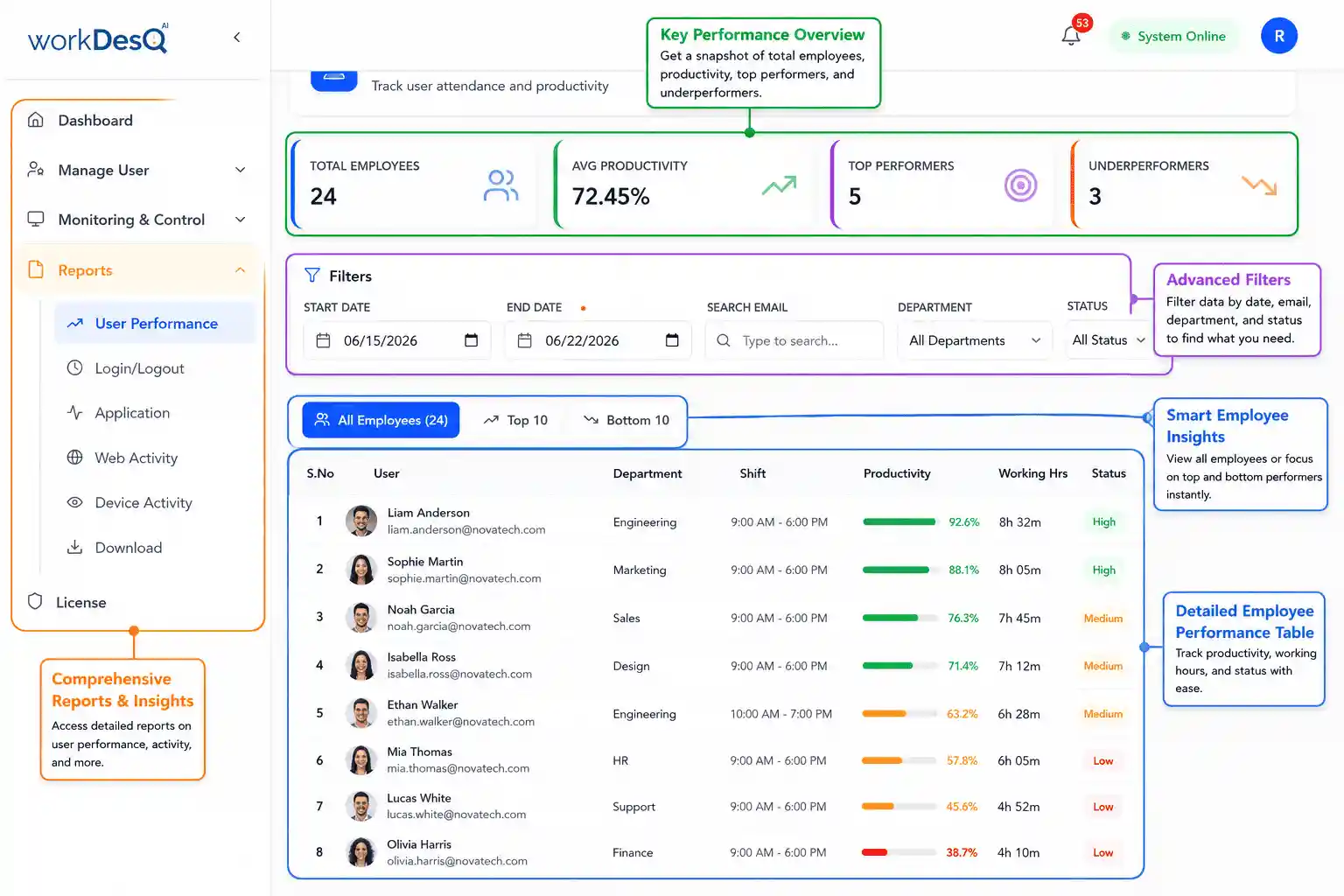
- Tracking working hours
Managers can track working hours and understand how they spend during working hours.
- Monitor attendance
With attendance you understand employee absence patterns like tracking login and logout or leave requests.
- Measure productivity
Managers can easily identify through work activity during working hours like how employees can be productive and where they need support.
- Make performance report
WorkDesQ gives employee productivity, attendance and application usage reports, and these reports will help managers take action. You can download in just one click in Excel and PDF format
Turn Employee Data Into Clear Performance Insights With WorkDesQ