See Productivity in Real Time.
Monitor employee activity, track work hours, and improve team efficiency with powerful insights.
If you are searching for how to find incognito history on Google Chrome you cannot see incognito browsing history in chrome because Google Chrome does not save history after the session ends. You cannot see website history even after opening chrome://history.
When a user closes all incognito window tabs Chrome does not retain browsing history after sessions and temporary site data but that does not mean all activity-related information deleted automatically.
Let us understand with an example if users download some files or any data from Chrome then they are still available. IT teams, employers and internet service providers can see this activity based on their access.
How to Check Your Chrome History
If you are using Chrome in the normal way instead of using incognito, then you can check your browsing history and here are some steps to follow
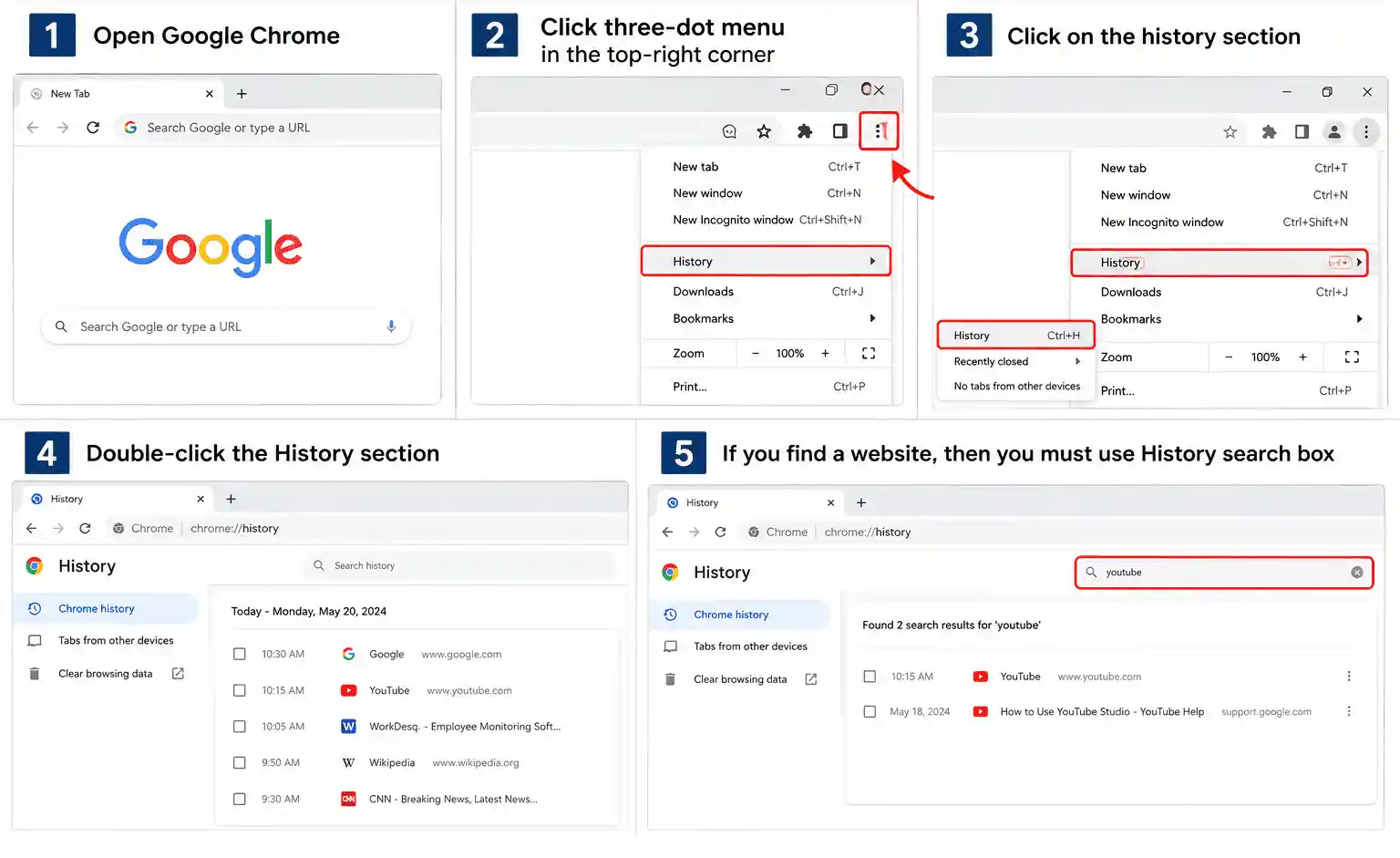
- Open Google Chrome
- Click three-dot menu in the top-right corner
- Click on the history section
- Double-click the History section
- You can see browsing history
- If you find a website, then you must use History search box
This method works only for checking regular history, not for checking Incognito history.
What Chrome Saves After an Incognito Session
Incognito does not mean that it saves nothing, yes there are some actions that you can check are still available on the device.
- File downloads
If you download any file in Incognito mode, then you can see in downloads section of the device and this activity is not deleted automatically
- Bookmarks
If you save any webpage bookmarks in incognito mode, then bookmarks are still available even after closing all tabs.
- Website and online service
Incognito basically controls what Chrome saves on your device. It does not completely prevent websites from seeing your activity
If you visit any website, then the website still collects your activity information like what you are looking at and which product you want to buy.
What Incognito Mode Actually Hides
Incognito mode mainly helps users who do not want to save their browsing history
- Browsing history
Incognito mode does not save any browsing history after the session ends.
- Cookies and site data
Temporary cookies and site data automatically removed when you close all tabs
- Sign in accounts
If you close all incognito tabs, then your account is automatically logged out.
- Form data
The information you enter in a form is not saved in Incognito mode
Difference between Incognito Mode and Regular Browsing
| Incognito Mode | Regular Browsing |
|---|---|
| It is good for temporary browsing | Best for daily browsing because you want browsing history save |
| You can use it as open fresh start | You can continue with your normally saved accounts |
| Useful when you check website for short time | This browsing for daily browsing needs |
| It keeps your usual browsing setup | Gives fresh browsing setup |
Can WorkDesQ Monitor Incognito Website Activity?
WorkDesQ is software that helps you understand website activity and see which sites are used most during work . WorkDesQ does not recover deleted chrome incognito history
- Which sites are used most by users during work
- Check time spent on different websites
- You can review website activity from the dashboard
- Identify the websites that may not be useful
- You can generate reports of browsing activity
- Identify websites that are unrelated to work
WorkDesQ Can Help Track Website Activity During Work
Conclusion
Chrome cannot show Incognito browsing history because Chrome cannot retain normal browser history. Yes, there might be some browsing activity you can check like downloaded files and saved bookmarks. You can check some information with the help of internet service providers.
When you are using WorkDesQ software you can collect all browsing data whether a user is browsing in incognito mode or browsing normally.
One important point is that WorkDesQ cannot find deleted browsing data even after closing all tabs.