See Productivity in Real Time.
Monitor employee activity, track work hours, and improve team efficiency with powerful insights.
Sometimes employees stop replying to senior emails, calls and messages. It is very common behavior of every employee but there might be some issue behind this behavior like they are handling family problems, health issues and some work-related problems or sometimes employees miss email during a busy work schedule.
The right approach in this situation is followed up professionally without any assumptions and this where sample email to unresponsive employee work because it already such kind of situations, helping managers to get updates and maintaining proper communication record.
When Should You Use a Sample Email to an Unresponsive Employee?
Here are some common reasons to use a sample email to an unresponsive employee as an HR professional or business owner.
- You do not know how to handle an unresponsive employee.
- You are writing an email for the first time.
- When you do not know what information to include
- When you want to avoid rude or emotional language
- You need an email that is clear and simple
- Want to record all written communication
Before Using a Sample Email to an Unresponsive Employee
You have to check some main points before using unresponsive employee email sample
- Choose that sample that match your opinion
- Check sample must include employee name, date, job title, subject and other details
- Sample is written in professional and respectful language
- Mention the expected response timely
- Check email content for spelling and grammar mistake
- Save copy for the future records
1. Sample Email to Unresponsive Employee (Friendly Follow-up)
This sample is best for when employee not replying from one or two days
Subject – Follow-Up (Project name)
Hi, (Employee Name)
I hope you are doing well
I am following up on (Project Name) which we discussed already. I just wanted to check if you need additional support for completing this project .
Please share your short update by (Date and Time). If you are facing any issue, please let us know and we are happy to help.
Thank you and I look forward to your reply
(Your Name)
(Your Job Title)
Why this sample works – This sample includes polite and supportive tone language, in this sample company do not assume that the employee avoids emails intentionally. It encourages communication and provides support for any need.
2. Sample Email to Unresponsive Employee for a Missed Deadline
This sample is best when project work stops because an employee is not replying
Subject – Urgent actions required for (Project Name)
Hi (Employee Name)
I hope you are doing well
I have tried to contact you many times regarding (Project Name) but I have not received any call from your side.
The deadline for this project was passed and we need an update to move this project forward. Please review this email and reply by (Date and Time)
If you are unable to reply to this email because of illness or an emergency, please let us know.
Thank you we look forward to your reply
(Your Name)
(Your Position)
Why this email works – This sample email explains the situation clearly without using rude or aggressive language. It reminds the employee about the missed deadline and gives them one chance to explain their situation.
3. Final Reminder Sample Email to Unresponsive Employee
Best when you have tried many follow up calls and messages but the employee is still unresponsive.
Subject – Final reminder and immediate response required
Dear (Employee Name)
This is the final follow up regarding previous emails, phone calls and messages. We have tried many times but you are still unresponsive.
Please contact us by (Date and Time) and confirm your employment status and discuss your absence.
If we do not receive any response by (Date and Time), we may take disciplinary action.
(Your Name)
(Your Position)
(Company Name)
Why this email works – This sample email explains the consequences and gives a final chance to explain the situation.
Tips for Editing a Sample Email to an Unresponsive Employee
- You should replace the sample details with the correct employee information.
- Mention the clear reason for the email
- The message needs to be short and easy to understand
- Add correct dates, deadlines and meeting details
- Check spelling and grammar mistakes
- Remove information that is not useful for your situation
- Mention what action you expect from the employee.
- Make sure your email follows your company policy
- Do not forget to mention your name and position at the end
Common Mistakes When Choosing a Sample Email
- Using a sample without editing important details like the employee’s name, project name and date and time
- Selecting a sample that includes rude or unprofessional language
- Not mentioning clear response deadline
- Ignoring the company communication and HR policy
- Choosing a sample that is too long and includes unnecessary information.
How to Detect an Unresponsive Employee Through WorkDesQ
If you install WorkDesQ software, you do not need to look for a sample email to an unresponsive employee because WorkDesQ automatically tracks employee activity during working hours.
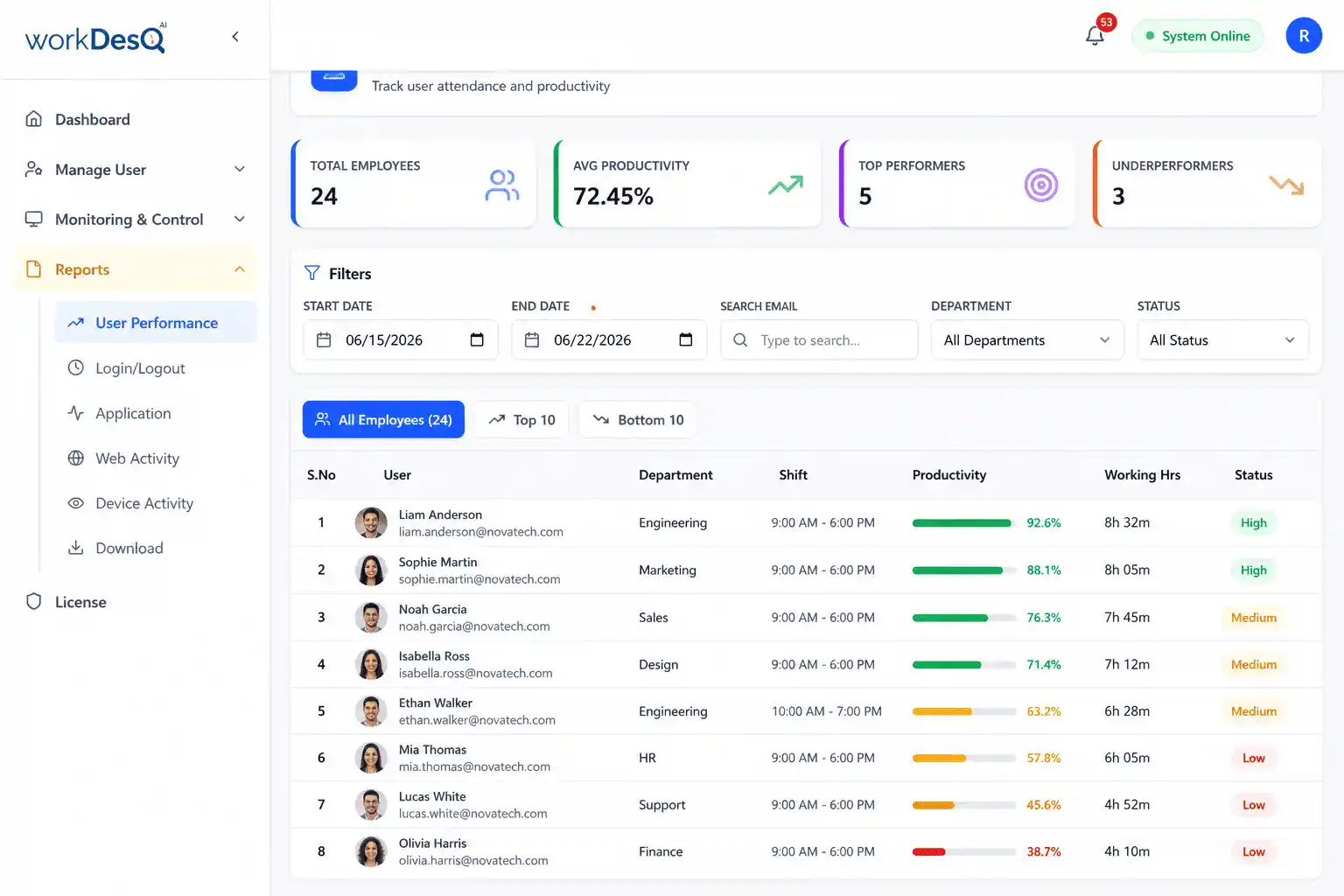
- Tracks employee login and logout times, so you can easily see whether an employee logged in or not.
- Shows active and idle time, helping you understand how much time an employee was actually working.
- Tracks application usage, so you can check whether an employee is using company software during work hours.
- Monitors screenshots, allowing you to see whether work is being done.
- Provides detailed employee activity reports in Excel and PDF formats that you can attach to an email.
Have questions about WorkDesQ or need technical assistance?
Conclusion
When an employee does not respond after a long time that does not mean the workplace has a problem. There may be some personal, medical and technical reasons. That is why sample email to unresponsive email plays an important role for making communication strong with respectful language and helps to understand employee situations.
Read unresponsive employee email samples carefully and edit according to your need then send to employee and this sample HR professionals to maintain communication record and get chance employee to prove their situations.