See Productivity in Real Time.
Monitor employee activity, track work hours, and improve team efficiency with powerful insights.
The best way to track time spent on projects is to use time tracking tools that are integrated with your project management tool. With this you can record how much time employees spend on each project. It also improves accuracy and reduces manual effort.
You get a clear view of project progress, budget and team productivity. You need to maintain a balance between deadlines, scope and budget to complete a project successfully. Scope is usually planned before the budget but if you do not track time properly then it is very hard to control.
Today most teams handle multiple tasks during working hours.
- Attend meetings.
- Reply to emails.
- Handle unexpected tasks during working hours.
Without the best time tracking tool, you cannot measure how much time employees spend on projects. You also cannot know if the time spent is profitable or not. That is why it’s more important to understand what are the possible ways to track time spent on projects.
Why Tracking Time Matters More Than Ever
Time is a valuable resource for every team. If it is not tracked by the company then teams cannot manage deadlines and workloads properly. Accurate project time tracking helps you
- Understand how much time the team spends to complete tasks
- Improve estimates and project planning
- Tracking billable and non-billable hours
- Identify productivity problems.
- Prevents projects from exceeding their budget
- Improve resource allocation.
Why Guesswork is Ruining Your Project Budgets
Many companies use old time tracking methods and this creates many problems such as:
- Missing billable hours
- Inaccurate project reports.
- Poor project estimates.
- Reduce profitability
Let us understand with an example
Suppose a task was estimated to take 5 hours but it actually took 10 hours, if these things happened in every task, then it reduces project margins.
Benefits of Tracking Time Spent on Projects
Using the best way to track time spent on projects offers many important benefits
Better project profitability
When you know how much time is spent on a project then you can easily identify profitable and unprofitable projects.
More accurate client billings
For service businesses, tracking time accurately helps make sure clients are charged fairly for the work they receive.
Improved resource planning
Managers can easily see which employees have projects and which employees are overloaded.
Better future estimates.
Historical data makes it easier to create project timelines and budgets for the future.
Increased accountability
Team members get a clear view of project deadlines without constant supervision from managers.
Step-by-Step: The Best Way to Track Time Spent on Projects
1- Break large projects into smaller parts
Start breaking large tasks into smaller parts. For example, if your team designs a website, you can divide it into content writing, development and testing.
2- Track time while you are working
The best way to track time spent on projects is to record time when work happens.
3- Keep all data in one place
Using separate tools for projects and time tracking can create big problems so try to keep task deadlines and time records together
4- Review the reports regularly
Time tracking is useful when you review reports regularly. Check weekly and monthly reports to compare planned hours with actual hours spent.
By following these steps, you can track time better and make better decisions for your team.
Comparing Different Project Time Tracking Methods
| Tracking Method | Accuracy | Effort | Best For |
|---|---|---|---|
| Manual Spreadsheets | Low | Difficult | Freelancers & individuals managing projects |
| Retroactive Timesheets | Low | Moderate | Small teams |
| Real-Time Timers | High | Easy | Agencies & startups |
| Integrated Project Tracking Systems | Very High | Very Easy | Medium & large teams |
How to Choose the Right Project Time Tracking Tool
- Easy to use
Choose a tool that is simple and easy to use so everyone can understand it.
- Automatic time tracking
Choose a tool that can start and stop automatically so you do not have to enter hours manually.
- Project task tracking
The tool should track time for different projects automatically.
- Works with other tools
Make sure the tools connect with software which you already use
- Affordable pricing
Compare the prices of different tools and choose one that fits your budget.
- Good customer support
Pick a tool that provides quick customer support when you need it.
Best Tools for Tracking Time Spent on Projects
| Tool | Best For | Key Features |
|---|---|---|
| WorkDesQ | Small & Large Businesses | Time tracking, attendance, project management |
| Toggl Track | Freelancers | Simple timers, reports |
| Clockify | Small teams | Time tracking, timesheets |
| Harvest | Agencies | Billing, invoicing, time tracking |
| Asana | Large teams | Project management with time tracking |
Top Challenges of Tracking Time Spent on Projects & Solutions
| Common Challenge | Simple Solution |
|---|---|
| Employees forget to start or stop timers | Enable reminders and notifications |
| Too many task categories create confusion | Use standardized project templates |
| Missing or incomplete time entries | Review time logs every week |
| Employees resist time tracking | Clearly explain the benefits for the team |
| Difficult to understand reports | Choose tools with easy-to-use dashboards |
When you handle these challenges early you can improve your team’s work quality and meet project deadlines on time
Combining Project Tracking with Daily Attendance
Yes, project time tracking is very important but business owners also want employee attendance data. This is where a login and logout management system plays an important role.
Project time tracking tells you about
- What task are completed
- How much time spent on task
- Which task consume more resource
Attendance tracking tells you about
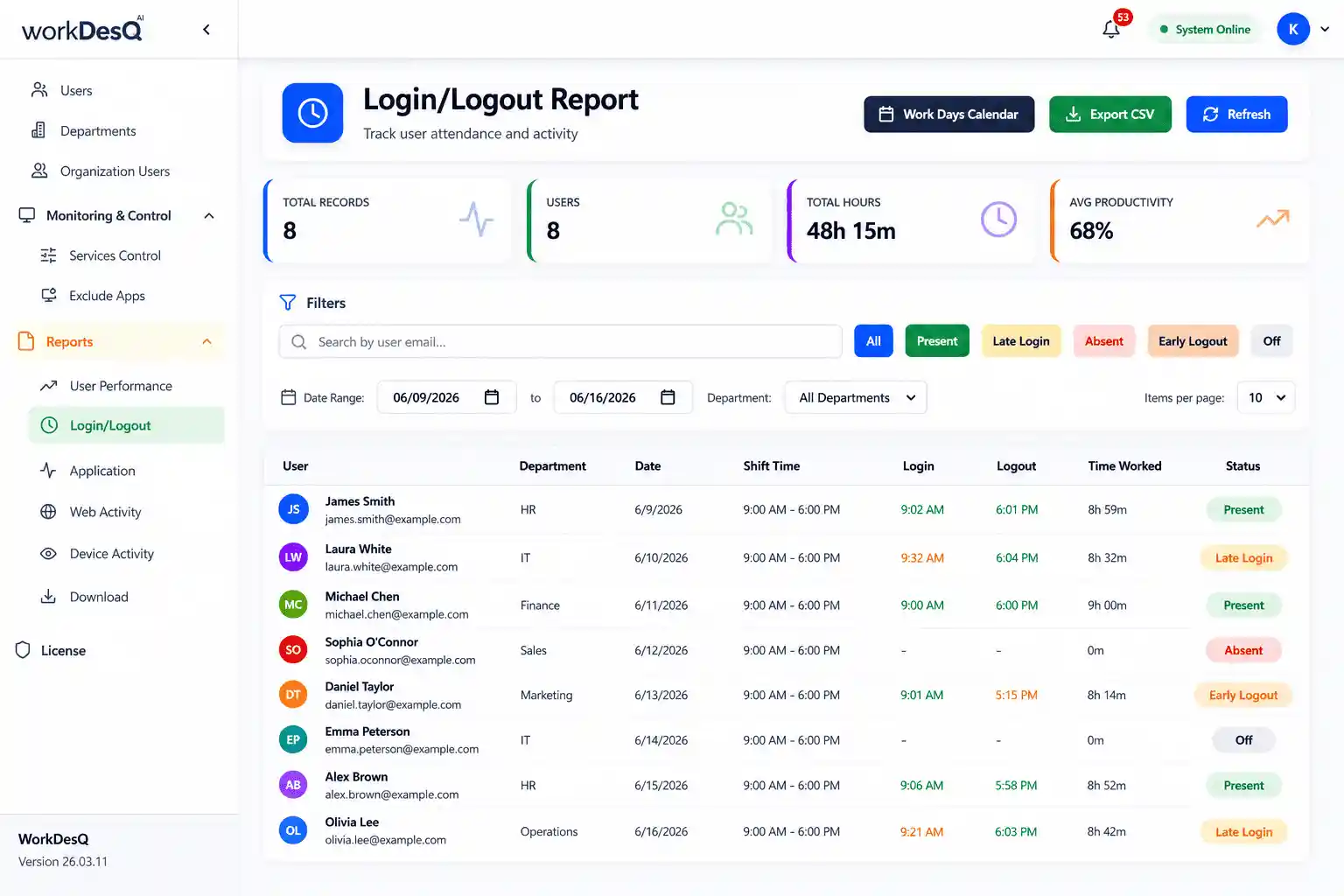
- When employees start work.
- When did they finish
- How many hours they worked
When you combine both tools together then you get a clear view of team productivity.
Manage attendance the easy way
Important Features for Tracking Time Spent on Projects
One-Click Start and Stop Timers
Employees should be able to start and stop timers quickly when they switch between tasks.
Project wise reports
Managers can see which tasks take more time and which do not.
Budget tracking
Managers get alerts when projects are close to their allocated budgets.
Simple dashboard
Monitor project progress and tracked hours from one place.
Final Words
If you use the best way to track time spent on projects then you and your team can grow faster, improve productivity and deliver projects on time. When you combine project tracking with a login and logout management system you get a clear view of employee attendance and project performance.
If you have complete information about employee availability and time spent on projects then you can make better plans, set project budgets and make better decisions for your team.