See Productivity in Real Time.
Monitor employee activity, track work hours, and improve team efficiency with powerful insights.
User activity monitoring software is designed to identify how employees use computers, applications, and websites during office hours. It helps companies to understand employee action and check unusual activities so that productivity can be improved and security stay safe. Modern user activity monitoring software usually operates through just a very simple process.
- Software records user activities across applications, websites and systems
- Creates detailed records to track user activity
- Generates detailed records of idle and active time
- It can find unusual or risky activities like downloading software from unauthorized websites
It creates reports that help managers in improving both productivity and security.
Companies use these tools to understand how work is done and rather than depending on guesswork and companies can place their trust in actual activity data. and we would like to mention that best tool for monitoring user activity is our WorkDesQ software.
Why Businesses Need User Activity Monitoring Today
Many companies depend a lot on computers and cloud applications for their operations. So, employees perform their work through digital systems. As a result, companies often face several common problems:
- The inability to gain a clear view of daily
- The difficulty involved in monitoring the activities of remote employees.
- Since all work is conducted on computers and cloud applications, the risk of unknown access increases.
- When employees spend too much time on non-work-related applications, it becomes difficult to monitor specific activities occurring within those applications.
- It often becomes impossible to track work-related activities and communications taking place between different departments.
If a company does not use a user activity monitoring system, managers may make decisions based on guesswork.
How User Activity Monitoring Software Works
User activity monitoring software is about just collecting data. Its main goal is to turn that data into useful information so that managers can make the right decision according to their employee activity.
1. Data Collection
The user monitoring software installs in employees devices.
Check application usage in working hours
How many employee websites visited
Employee Login and logout times
2. Activity Analysis
With this you can identify
Active working time
Idle time like no activity on screen during working time
Application usage frequency
Time spent on work-related tools
3. Working Alerts
Many user activity monitoring tools also send automatic alerts to managers and HR department
Unwanted file downloads from computer
Unusual login activity without permission
Access outside of set working hours
Installation of unknown software
4. Visual Reports
Monitoring platforms turn raw activity data to make clear reports for managers
Productivity scores of employees
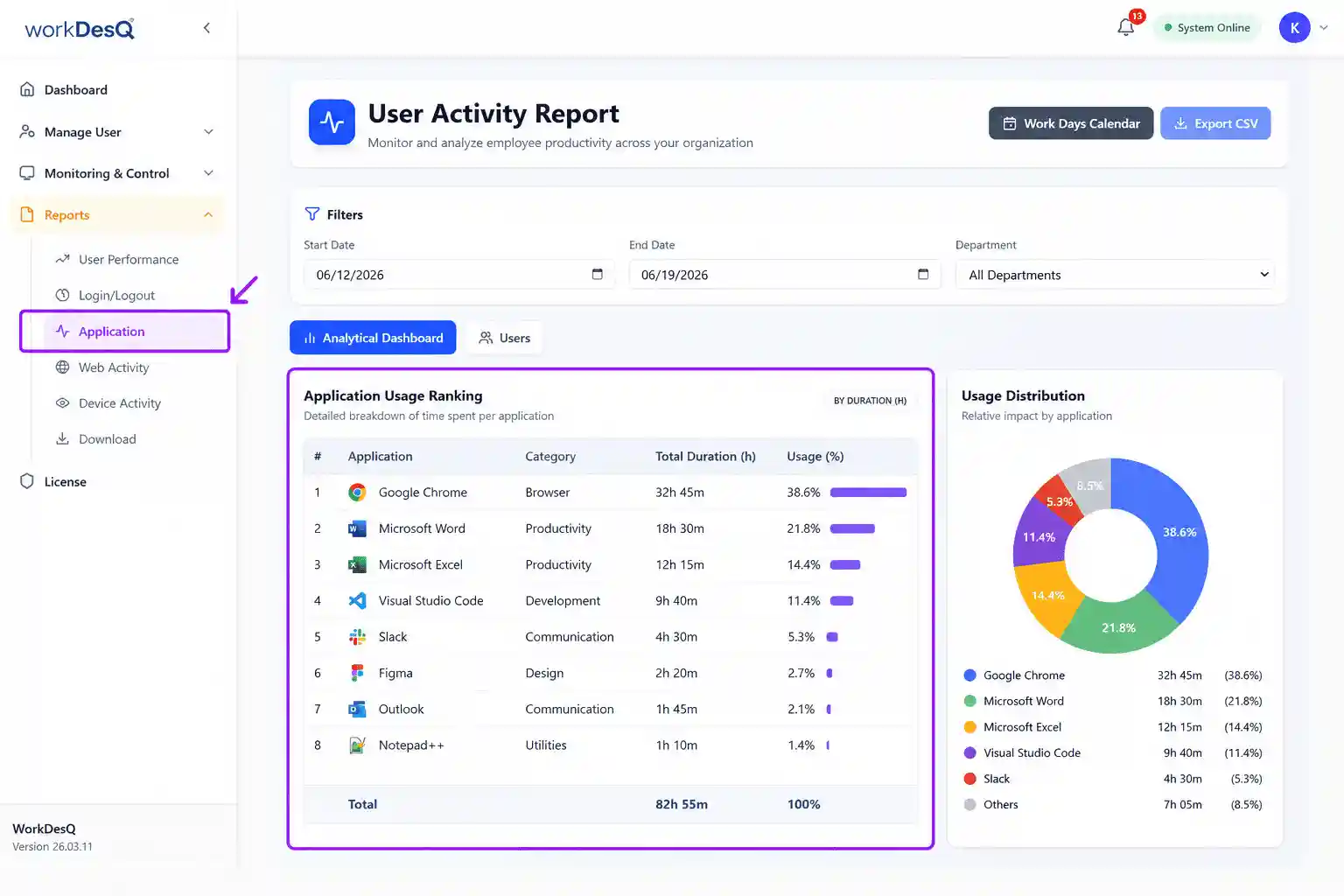
Application usage time reports
Daily work patterns
If you want to manage all four key points in one software you should talk to the WorkDesQ support team today.
What Does User Activity Monitoring Software Track?
Application usage – You can check which applications are used most and how much time employees use
Website activity – Employees visit most sites and how much time they spend
Active and idle time – You can easily monitor how actively employees work and how much time the system was idle
Login and logout – Track when employees log in and log out their systems
System activity – It can be record relevant activities on the computer
Work patterns – Reports help managers to understand working patterns and productive working hours
The Hidden Challenge Most Companies Face
Many companies think that simply using monitoring tools automatically and thinking like all problems are solved automatically related to employee activity but this is not true. When companies start tracking many metrics like user activity monitoring tools generate too much data that becomes difficult to understand. But in the initial stages, you should focus on just three key metrics
- Application usage activity
- Website activity
- Active vs. idle time
These three factors are the most effective in helping to measure productivity. If you would like to identify which specific employee performance metrics are based for you to track, we invite you to read our blog.
Who Should Use User Activity Monitoring Software?
- HR teams
HR can use it to understand employee work activities, attendance and productivity during working hours
- Manager
Monitor team performance and work progress
- IT teams
Manage applications, system and device related activities
- Remote teams
For checking remote employee work activities and getting visibility in work patterns
Comparing Basic vs Advanced Monitoring Software
| Feature | Basic Monitoring Tools | Advanced Monitoring Software |
|---|---|---|
| Application Tracking | Tracks which applications are used | Shows detailed app usage and time spent |
| Website Monitoring | Tracks visited websites | Categorizes websites and shows browsing patterns |
| User Activity Records | Stores simple activity records | Allows advanced filtering and deeper analysis |
| Productivity Analytics | Provides limited insights | Offers detailed dashboards and productivity reports |
| Security Alerts | Few or no alerts | Sends automatic alerts for risky activities |
Companies usually compare monitoring tools based on the features. Some tools offer only basic tracking and some others tools provide deeper analysis and giving detailed reports.
How to Choose the Best User Activity Monitoring Software
- Choose software which tracks accurate application usage
- The software should allow you to categorize and review website activity
- The software should provide insights into productivity, idle time and active work time
- Data should be generated in easy-to-understand reports
- Software also provides instant alerts to managers if employees log in and log out from their devices
- Keeping employee activity data secure is very important
- HR or managers do not need much training and it is easy to implement
Is User Activity Monitoring Software Legal?
Yes, user activity monitoring software is completely legal when you use the software properly
- Employee notification
You should clearly tell employees that the company uses user activity monitoring software
- Company policy
Company policy explains main purpose of monitoring
- Privacy concern
Collect only work-related activities and prevent tracking personal information of employees
- Data security
It is important to protect collected employee activity data with proper security controls
- Applicable laws
Your software follows all local labor laws because every country has different labor laws.
Role of Application Usage Monitoring in User Activity
Application usage is an important part of user activity monitoring software. It gives answers to many important questions like
- Which tools do employees use most in working hours?
- Are expensive tools being used well or not?
- Which applications take so much time in working hours like Canva or Photoshop?
This is the real life based example when a manager apply user activity monitoring tool
- 60 percent of the time was spent on development tools.
- 20 percent was spent on documentation platforms.
- 20 percent was spent on communication platforms.
After looking at this data, managers reduced unnecessary meetings and improved the workflow.
Tracking User Web Activity in Remote Work Environments
The demand for user activity monitoring software in remote work environments has increased day by day because most teams operate using browsers and cloud based applications that are not easily monitored. Monitoring software tracks this activity across on major things
Project management tools
Collaboration platforms
Cloud storage services
Communication systems
This information helps companies understand how remote teams work online and with user activity tracking software you can download full reports of work from home employees like what is their idle time or tool usage.
Start Using User Activity Monitoring Software
- Define Monitoring Goals
- Select the Monitoring Area
- Clearly tell Policies
- Start with a Pilot Team
- Regularly Review Reports
You can easily start using user activity software by following these steps. This gives correct employee data.
Conclusion on User Activity Monitoring Software
Modern companies use digital tools and tracking how employees use these tools is often difficult. This presents numerous difficulties for these organizations. This is where user activity monitoring software helps solve these problems.
Monitoring is not about just watching every single action of employee activity. It focuses on how employees use official tools, improving productivity and keeping computer systems safe. A company can only increase growth when its employees perform their duties effectively and using the corporate tools properly
You should focus on your actual needs when choosing the best user activity monitoring software that provides accurate activity tracking data, easy-to-download reports, productivity insights and security alerts. If you monitor user activity with the right approach, you can easily make data-based decisions instead of relying on guesswork.