See Productivity in Real Time.
Monitor employee activity, track work hours, and improve team efficiency with powerful insights.
Browser history capturer is a specialized background application which automatically tracks browsing history on desktop and mobile.
This software collects complete data of URL addresses, page titles, access timestamps, active page engagement and download activity then it shows all data in one dashboard.
Highlights of Browser History Tracking
- Operation – This system captures real time web activity when users use their systems.
- Primary goal – The main purpose of a browser history capturer is to record daily digital activities. It improves workplace productivity, protects company data and helps maintain compliance.
- Core function – This system works as a website usage tracker and Chrome history tracker which provides exact URLs, active time, idle time and records search queries accurately and media downloads
- Legal and ethical standard – This software legally works on company owned laptops when companies use clear acceptance policy.
Monitor Employee Browsing Activity
Today, modern companies use cloud applications, web research and SaaS platforms to do daily work but if a company is not using a web activity monitoring system, then it is very difficult for managers to understand how employees spend their time on the browser during working hours. A dedicated browser history checker provides a clear browsing activity overview.
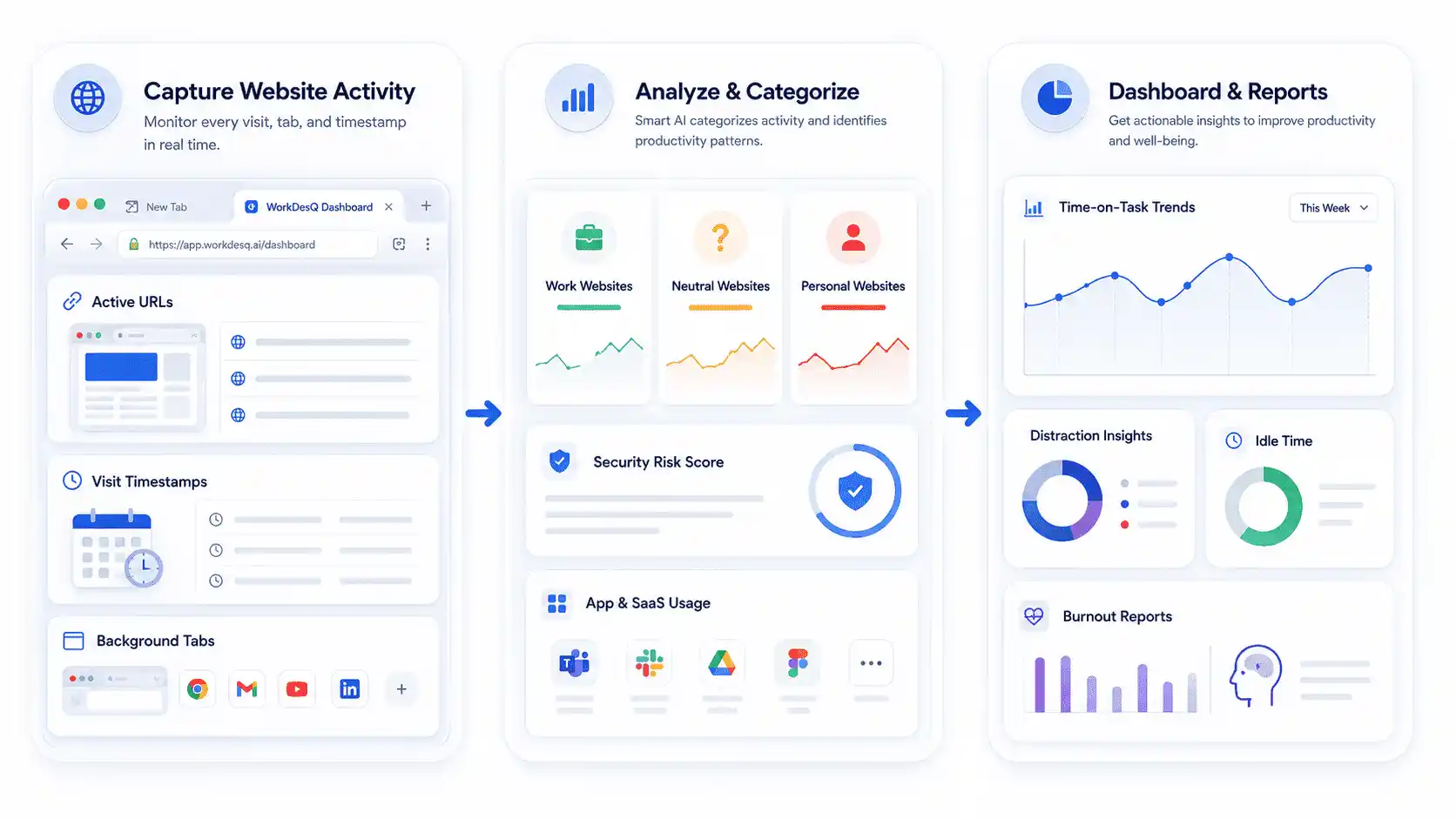
- Capture Website Activity
- Active URLs
- Visit Timestamps
- Background Tabs
- Analyze & Categorize
- Work, Neutral & Personal Sites
- Security Risk Score
- App & SaaS Usage
- Dashboard & Reports
- Time-on-Task Trends
- Distraction Insights
- Idle Time & Burnout Reports
Differentiating Work from Distractions
A browser capturer tool not only tracks open tabs; It also tracks the active screen in real time This helps managers understand whether an employee is using work websites or personal websites during working hours
Tracking tool adoption
It measures how much time employees use company paid tools and this data helps to identify unused licenses and workflow bottlenecks
Spotting Burnout and Overwork Patterns
Continuous activity logging helps managers to understand that employees work after working hours or switching tabs frequently so that managers balance workloads and identify signs of burnout.
How a Browser History Capturer Works
- System-Level Interception
The software does not only depend on browser extensions, It connects with the operating system and network interface for capturing browser activity
- Data Extraction
When employees use Google Chrome, Firefox or Edge then software tracks exact page URL, window title and accurate timestamps
- Active vs Idle Discrimination
Advanced browser history tracking system monitors keyboard activity and scrolling activity. If the desktop is open without any activity, that time is not counted as active working time.
- Encrypted Cloud Transmission
All recorded browsing activity is securely uploaded in dashboard and Managers can view employee activity reports and download reports whenever needed
Why Businesses Need Browser History Tracking
Companies work in different modes like hybrid or remote work mode and in this work mode style it is very difficult to understand daily web activity without any browser history capturer. That is why companies want to make this process easy
- Managers can easily identify non-working websites
- Improve team productivity because employees know that they are being monitored so they focus on the work
- Monitor remote and hybrid employees for same level visibility
- See which websites are used most of the time and this helps managers to understand browsing patterns
- This will help in improving internet usage policy
What Information Can a Browser History Capturer Record?
- It records time spent on each website
- Records the exact date and time of every website visit
- The software records keywords searched in the browser
- Private browsing activity like when employees use Incognito mode
- Details of file download like name and size of file
- Records how frequently employees use websites
- Device name like employee using which device desktop, laptop or mobile
- Identifies risky websites that may be harmful to the company
Benefits of Capturing Browser History
A reliable browser history capturer provides many benefits after implementation
Higher operational focus
When web activity is clearly monitored then automatically reduce unnecessary distractions and employees focus more on their work.
Enhanced Network Security
With the help of the software, companies can identify harmful links, ransomware attacks, phishing attempts and corporate data at early stages
Optimized SaaS Expenses
After reviewing reports of unused software businesses can identify unused licenses and remove them and reduce subscription cost.
Common Use Cases Across Industries
- Healthcare
Healthcare organizations ensure that patient can access encrypted portal and it protects sensitive medical information
- Finance and Banking
Banks and financial institutions monitor web activity so that any bank employee not sharing customer financial information through any website and It prevents fraud and data leakage
- IT and software development
IT and software development companies monitor research time and usage of development tools
- Remote and Hybrid Workplaces
Browser history capturer provides clear visibility of visited websites
Browser History Capturer vs Browser History Checker
Both terms look similar but the purpose and working process is very different from each other.
| Browser History Capturer | Browser History Checker |
|---|---|
| Records website activity automatically | Shows browsing history when someone checks it manually |
| Runs silently in the background | Depends on the browser’s saved history |
| Stores browsing history even after users clear browser history | Shows history only if it has not been deleted |
| Provides data for multiple users in one dashboard | Mainly useful for checking a single device |
| Makes it easy to review browsing activity over several days | Shows only the current browsing history |
Is Browser History Monitoring Legal?
Yes, because when employees use company owned laptops and employees accept the company laptop policy then companies can monitor employee website activity specially in the USA, Canada, United Kingdom and Australia.
You have to follow some steps for legal and ethical monitoring
- Ownership Requirement
Monitoring is conducted only in company owned gadgets and do not monitor employee personal gadgets without their permission
- Written Consent
Companies should have a clear acceptable use policy which explains which data is collected or not
- Privacy Limits
Monitoring is only limited to working hours and does not track employee personal messages or emails.
Best Practices for Ethical Browser Monitoring
Installing browsing history capturer is not enough, maintaining trust, transparency and following responsible monitoring is also equally important.
Maintain full transparency
Inform employees before implementing monitoring and tell purpose and what data is collected
Monitor work results, not website visits
Using report for improving workflow and make better decision
Restrict personal website
Browsing history capturer helps to restrict personal website like social media websites
Protect browsing reports
Store website browsing data securely and allow access only to authorized people
How to Choose the Right Browser History Capturer
- Choose a tool that is easy to use.
- Check browsing data it records
- Make sure all reports are clear and easy to understand
- Check software browser compatibility it should work with all browsers like Google Chrome, Firefox or Opera
- The software should work with small teams, mid team size and large teams
- Compare pricing and features
Why Choose WorkDesQ For Browser History Capturing
Today tracking browsing history is not enough for any businesses, they want one solution which helps in improving productivity, respecting employee privacy and meaningful insights.
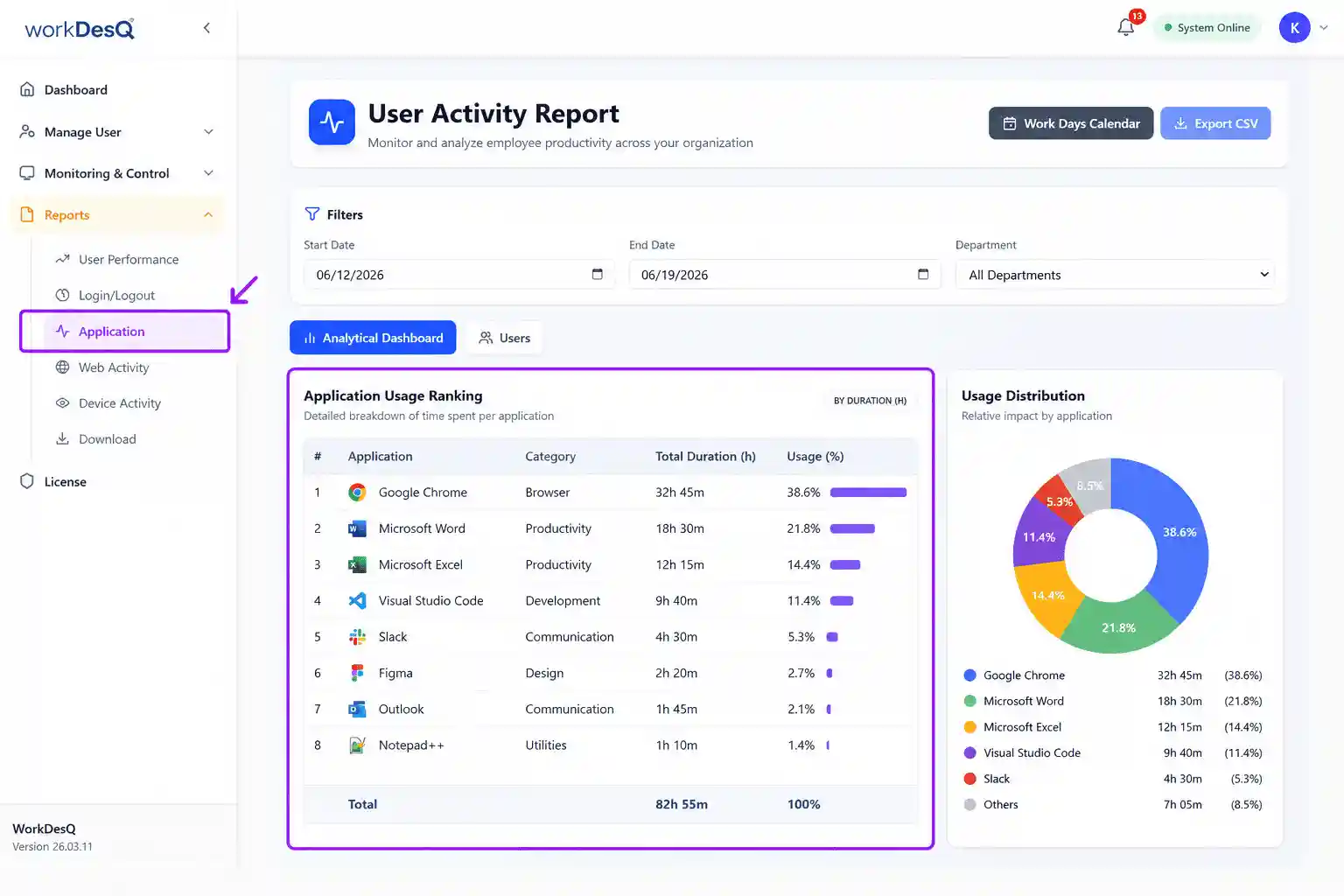
- Easy to use and simple dashboard does not require training to use
- Real time tracking, managers can see live website activity
- WorkDesQ help you keep clear records of website visited during working hours
- Easy report export management can download all browsing history report whenever needed
- Access browsing records without delays
- WorkDesQ has 24×7 customer support.
Final Thoughts
The main purpose of a browser history capturer is to provide better visibility of website visits so that employees can improve productivity, secure company data and manage workflows efficiently.
When browser history monitoring is done with transparency and respect employee privacy, it helps to build trust and supports better performance. If you are searching for a trusted solution for tracking browsing history, WorkDesQ is the better option because it provides
Browser activity monitoring
Time spent on visited websites
Application usage monitoring
Managers can make easy decisions based on these features and reduce unused websites.