See Productivity in Real Time.
Monitor employee activity, track work hours, and improve team efficiency with powerful insights.
Using work laptop for personal use is allowed when employers give permission for that. Some companies allow employees to check personal emails or messages during breaks but many companies completely ban using office laptops for personal work. Your activity can be monitored according to company policy and local laws because it is company property. Before using a work laptop for personal use you need to learn the company policy about work laptops usage and disciplinary actions if you use without permission.
Some common point you not ignore
- You should use office laptops only for official purposes
- Personal use depends on the company laptop usage policy
- Employers have the right to monitor application and website usage
- Downloading unknown files can lead to data risks
What Does Using a Work Laptop for Personal Use Mean?
Using work laptop for personal use means when an employee uses the laptop for personal activities like social media if the company allows it. Here are some common examples of personal activities
- Check personal emails during working hours on a company laptop
- Purchasing some personal products
- Paying bills like home bills
- Using social media
- Booking travel tickets
- Browsing new websites
- Accessing personal cloud storage
Is It Okay to Use a Work Laptop for Personal Use?
The answer depends on the company laptop usage policy. Some companies allow it and some companies completely ban it. If you want to use a work laptop for personal work you should ask yourself these questions
- Is the company allowing me to do personal work on the office laptop?
- Am I accessing confidential information about company
- Could my activity lead to a security risk?
- Am I using company time appropriately?
If you have any doubt use your smartphone instead of the office laptop
Why Companies Create Work Laptop Policies
A company laptop is not just a device. It contains important information that must be protected from cyber attacks and accidental data loss. Some reasons why companies create policies
- Protect confidential information
- Reducing cyber risks
- Stop malware and phishing attacks
- Improving employee productivity
- Follow legal requirements
- Keep personal data and office data separate
A well written office laptop usage policy helps employees understand if they can use the laptop for personal work and when the company may take disciplinary action. You can also use a company laptop policy template to create clear rules and ensure every employee follows the same guidelines.
Biggest Risks of Using a Work Laptop for Personal Use?
- Risk of data leaks
- Data privacy concerns
- Reduced productivity
- Compliance problems
- Malware and virus infection
- Loss of company data
- Mixing personal and business data
Can Your Employer Track Your Work Laptop Activity?
Yes, most companies have the right to monitor your activities when you use office laptops and employer have right to get full information about
- Application usage tracking
- Login and logout times for maintaining attendance records
- Tracking file transfers
- USB device activity
- Software installation
This monitoring is used to protect company assets and improve employee productivity.
What Personal Activities Are Usually Allowed?
Some companies allow personal use of work laptops and give permission to such activities like
- Checking personal email
- Online banking
- Paying urgent bills like your phone bills or family medical bills
- Booking doctor appointments
- Accessing government websites
These activities are allowed only when the company gives permission and they should take only a little time.
What Should Employees Never Do on a Work Laptop?
- Downloading pirated software
- Installing unknown applications
- Visiting suspicious websites
- Torrent downloads
- Playing games during office hours
- Sharing confidential files
- Copy office data through USB drives
Best Practices for Employees
- Before using a work laptop for personal use read the company policy carefully
- Keep personal use limited
- Always use personal device for personal work
- Never save personal accounts and passwords
- Do not install unknown software
- Keep the device secure by using antivirus software and avoid suspicious websites
Common Mistakes Most Employees Make Using Work Laptops
- Nobody can see your personal browsing
- Ignoring company IT policies
- Installing browser extensions without approval
- Logging into personal accounts on shared devices
- Saving personal photos and documents on work laptops
- Leaving laptops unlocked for a long time
Best Practices for Employers
To create a secure and transparent workplace employers have an important role
- Creating clear work laptop usage policy
- Explain to employees what they can use the laptop for
- Inform in advance about workplace monitoring
- Provide training to prevent security risks
- Restrict unauthorized software installation
- Review device activity on regular basis
How WorkDesQ Help to Manage Company Laptops
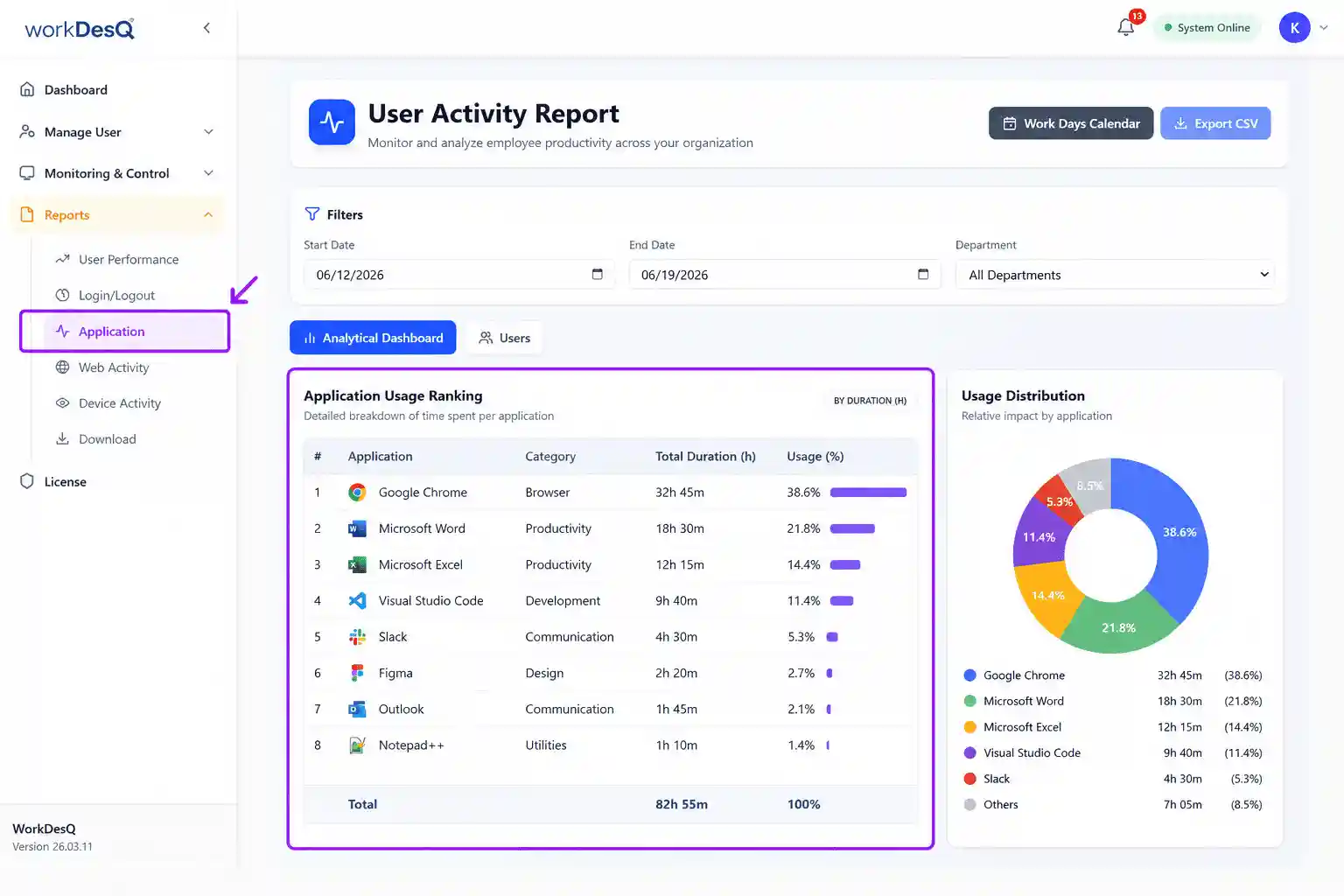
Managing company laptops is easier when employers use WorkDesQ application usage tracking software because it gives a clear view of device activity. When employers use WorkDesQ software
- Tracks application usage so you know how employees spend their time during working hours
- Monitors productive and non-productive websites
- Track login and logout times for calculating accurate work hours
- Helps you track remote onsite and hybrid teams
- Track idle time so that you can take action to improve employee productivity
- Generates detailed reports for HR and team managers
Application Usage Tracking Software
See how employees use company laptops without affecting their work.
Conclusion
Using a work laptop for personal use is fine if you follow the company’s guidelines because office laptops are company assets and personal activities may be monitored It helps prevent security risks
Employees should understand the company policy and should not download unauthorized applications. Employers should create a clear policy about personal use during office hours so employees can work better and improve productivity. Employers can use employee monitoring tools to monitor employee activities.